

IGEL has been known as a thin client manufacturer for many years, but there are changes that indicate bigger things from them in the near future.
Source: www.brianmadden.com
IGEL has been known as a thin client manufacturer for many years, but there are changes that indicate bigger things from them in the near future.
Source: www.brianmadden.com
IGEL, a world leader in endpoint management software for the secure enterprise, today announced that its Universal Desktop Converter™ , IGEL Universal Desktop™ UD3 thin clients and Universal Management Suite™ were selected by UNC Health Care to as part of the roll-out for the nationally-ranked health
Source: finance.yahoo.com
Additionally, the ease of integration between the IGEL UDC and IGEL UMS with Citrix XenDesktop and other solutions offered by Citrix Ecosystem partners, including Imprivata, has enabled secure access to the health care network’s Epic Systems’ Electronic Medical Records (EMR) system.

Virtual desktop infrastructure (VDI) improves workflow operations by eliminating long login processes and giving clinicians more time interacting with patients.
Source: hitinfrastructure.com

Available to purchase new devices thin & zero client devices of the Neutrino series with serial port COM1 (DB9) option.
Source: www.praim.com
If VDI and cloud services define the way resources and applications are delivered, there is still a big question mark on the future of the endpoint device.
Source: www.cloudcomputing-news.net
The evolution of the IT has been at an exponential rate.Now we’re experiencing the initial steps of shifting from physical hardware to Cloud
Source: www.praim.com

In the time of Industry 4.0, smart devices play an important role inside factories. Challenges can be overcome due to reliable thin clients.
Source: www.praim.com

Praim certifies its Windows and ThinOX thin and zero clients for VMware Horizon 7.0 virtual desktop infrastructure.
Source: www.praim.com
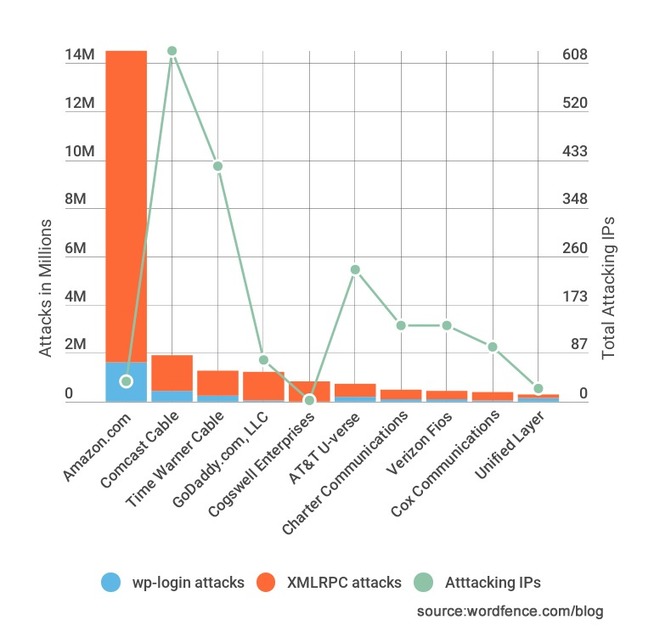
XMLRPC compared to wp-login as an attack target in WordPress. Which is more frequently attacked and how to protect your site against brute force attacks.
Source: www.wordfence.com
Regarding US XMLRPC and Amazon —
One possibility is that 36 servers at Amazon EC2 have been compromised and they have been used to launch a very rapid and wide-spread brute force attack during the past 2 weeks. That attack generated over 144 million failed login attempts across the sites we monitor.
An alternative theory is that a developer may be using EC2 to host an application that is trying to sign into WordPress websites using XMLRPC. The application may not handle bad user credentials correctly and may just keep retrying.

Cloud Shell rumors hint thin client model for Windows 10 successor to run on all kinds of devices may be in the offing for later in 2017.
Source: searchenterprisedesktop.techtarget.com
“What would be more interesting is if Microsoft is truly trying to make a version of Windows for the masses that runs in the cloud and then streamed locally to your machine, much like a thin-client, but the details around Cloud shell are still a bit foggy.”

In this tutorial you will find how to create, launch and delete a VirtualBox virtual machine by using the command line interface.
Source: www.praim.com

Praim has announced the signing of a distribution agreement with the next generation value-added distributor Cloud Distribution Storage Ltd.
Source: www.praim.com

The Unified Write Filter (UWF) allows you to redirect all disk writes to memory, making any change to the system temporary.
Source: www.praim.com

Milind Yedkar, Dell’s General Manager – Cloud Client Computing, Asia Pacific & Japan on thin client technology and how enterprises can benefit fro..
Source: news.google.com

…Thin clients deliver electricity savings store-wide of £45k over three years…Reading UK. Jan 4, 2017 – IGEL, a world leader in the delivery of powerful workspace management software
Source: www.realwire.com
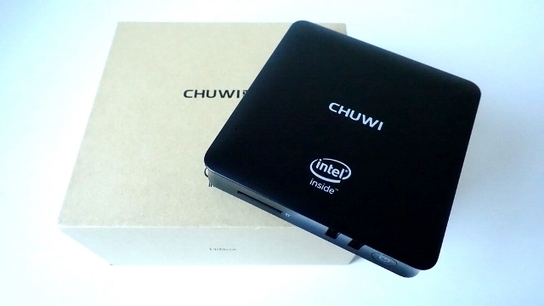
Let’s take a peek at the first mini PC of Chuwi dubbed as the Chuwi HiBox. It’s a dual-boot device supporting 4K video playback and more.
Source: www.xiaomitoday.com

Starting in February, new Azure customers will be sent to Microsoft’s Cloud Solution Provider program in lieu of the MPSA-based pay-as-you-go license
Source: www.infoworld.com
Source: cdn.ampproject.org

With Citrix’s HDX SoC technology, VDI shops can deliver virtual resources to thin clients and save time and money. Find out how it works.

In cloud computing 2017, there will be less — like serverless computing and lower prices — as well as more, like containers, analytics and storage.

Interactive desktop environments can be remotely accessed by using many technologies. Virtual Network Computing (VNC) is one of these.
Source: www.praim.com
In-depth article detailing exactly how to do VNC over WebSocket tunnel. And excellent writeup/tutorial!
Excerpt:
To evaluate if the WebSocket is a viable solution, we used VNCPlay[a], a set of tools to measure interactive performance. VNCPlay includes a VNC client that allows to record an interactive session and replay it under different system configurations. During the replay, the session output is saved into a log file. Two or more session logs can be fed to an analysis tool, included in VNCPlay, that produce response time statistics, which can be further elaborated. Response times to user activities are considered a good measure of interactive performance.
We built a test environment, composed of 3 LANs, that represent our “internet LAN”, the local network and the remote office network, and corresponds to the central, left and right parts in the figures above, respectively. The local and office LANs access to the internet LAN through two ZeroShell[b] router devices, each one configured to NAT the internal addresses to the router’s internet LAN address and to serve as default gatewayfor the internal LAN. The local LAN hosts the VNC client and the tunnel server with a port forwarding rule on the router to allow to connect to the tunnel server from the internet LAN. Similarly the office LAN hosts the tunnel client program and the machine running VNC server.
We used VNCPlay to record a test session, over a direct connection to the target machine with a Linux Mint OS.
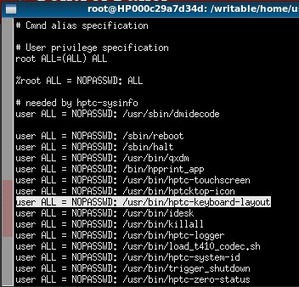
A blog about security research, web application security, software bugs and exploits.
Source: blog.malerisch.net

Not too many years ago, Peter Burris, head of research for the analyst group Wikibon, recalls being in a room full of chief information officers.
Source: siliconangle.com

Working as an IT Manager (or even worse, to be in charge of a computer lab) at a school is a demanding work. Each teacher has his own needs.
Source: www.praim.com
Working as an IT Manager (or even worse, to be in charge of a computer lab) at a school is indeed a very demanding work.
As you can imagine, every teacher has his own needs and really many of them. Plus, their highly probable lack of IT knowledge is not very helpful for us, technical assistants.
The problems that I am dealing with are more or less always the same:
1. Installation of multiple PC with many software (every teacher wants his or her own programmes that later are used by students).
2. Heterogeneous and diverse PC parks (which means different installations and difficulties even for drivers and basic services).
3. Security issues (open USB ports, shared passwords).
4. High PC failure rates as apparently students don’t care too much to take a proper care of them.
So, what can we do? Is it possible to change this situation?

Thin Clients Market Growth Opportunities, Analysis and Forecasts Report 2016-2021
Source: www.newsmaker.com.au

Amazon acquisitions indicate gaps in technology that AWS wants to fill. Here are the types of markets AWS could acquire in the future.
Source: searchaws.techtarget.com
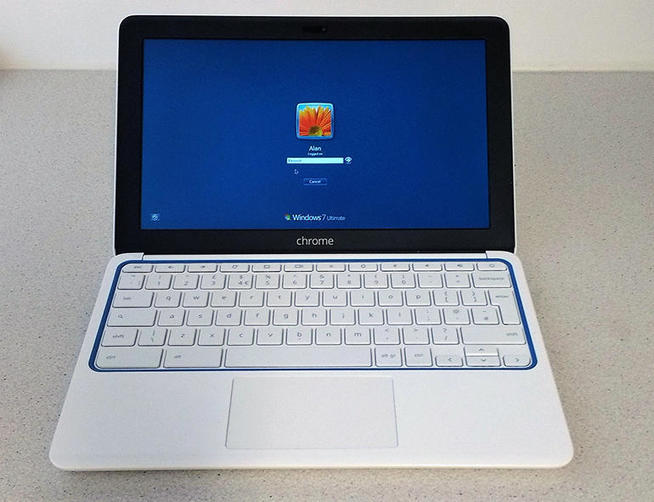
vSpace Pro addresses the pain points of complex and costly hypervisor-based VDI with a much simpler yet still effective alternative that shares desktops on just one Windows OS.
Source: www.zdnet.com

VMware Blast Extreme requires less bandwidth for graphics-intensive apps. Admins said PCoIP performance is to blame for their interest in switching to Blast.

It’s a story becoming too familiar, but no less scary. The latest wrinkle from the Yahoo security breach is the fear of credential stuffin
Source: www.bsminfo.com
